


Here is how easy it is to begin using StepCapture:
1. Easily begin capturing workflows by clicking the “Start Recording” button in the browser extension.
 2. Capture User Actions as Every action is paired with adaptive screenshots and detailed interaction logs, preserving context effortlessly
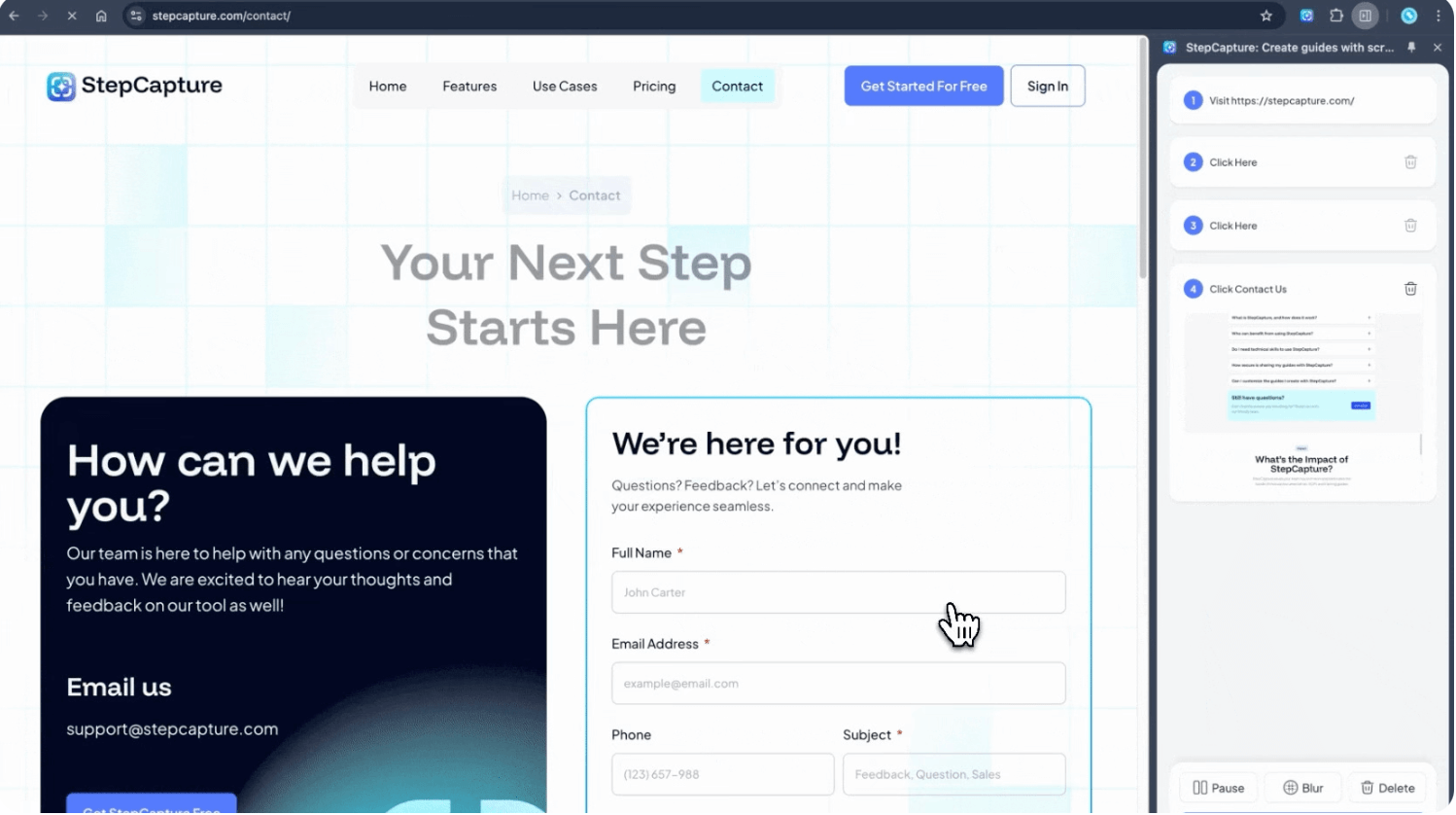
3. A shareable SOP with accurate logs depicting each recorded action in order, complete with screenshots, page titles, and URL snippets for clarity. Edit manually afterwards if needed.
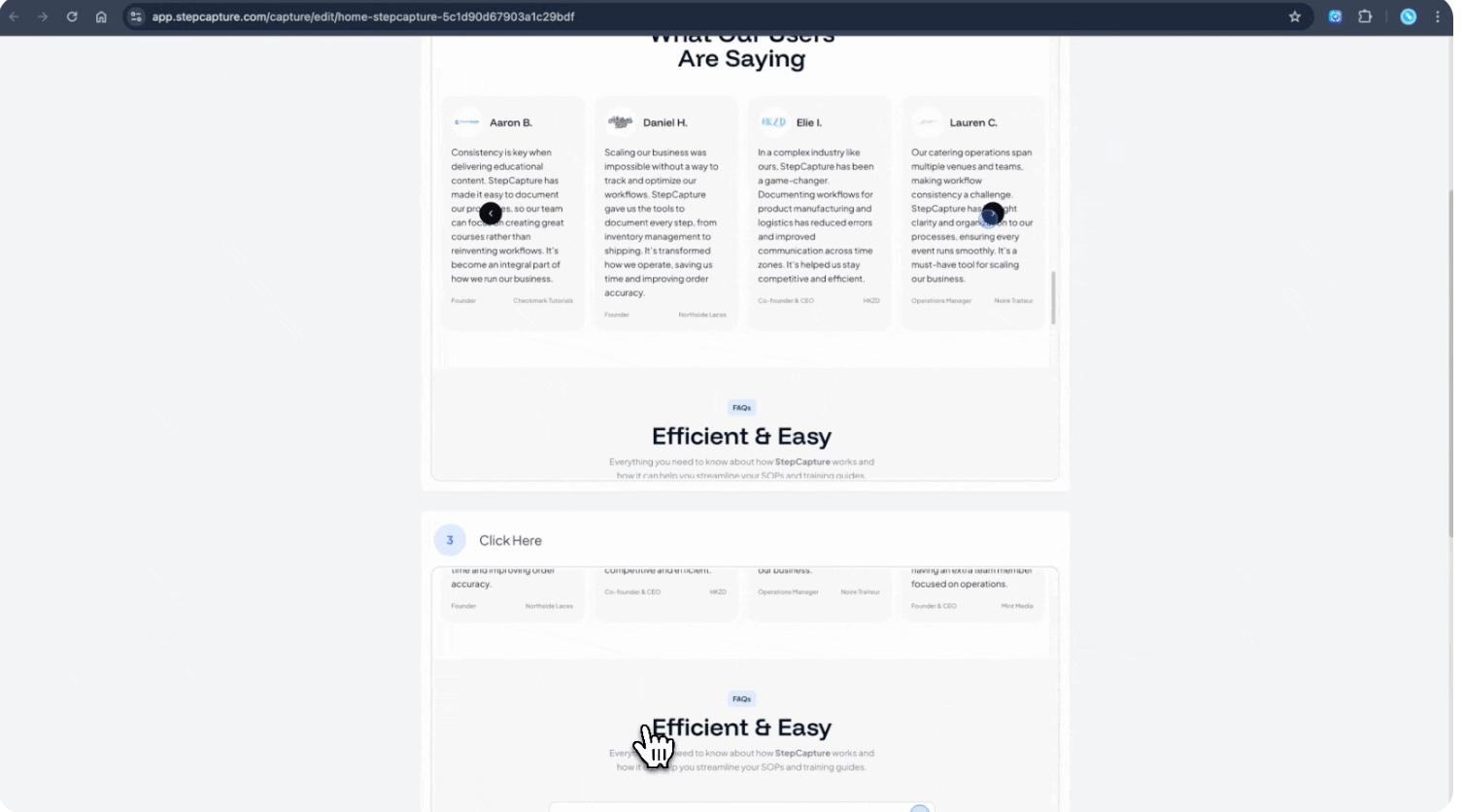
4. Share your captures instantly and securely with team members and clients. Control access permissions and maintain version history with ease.

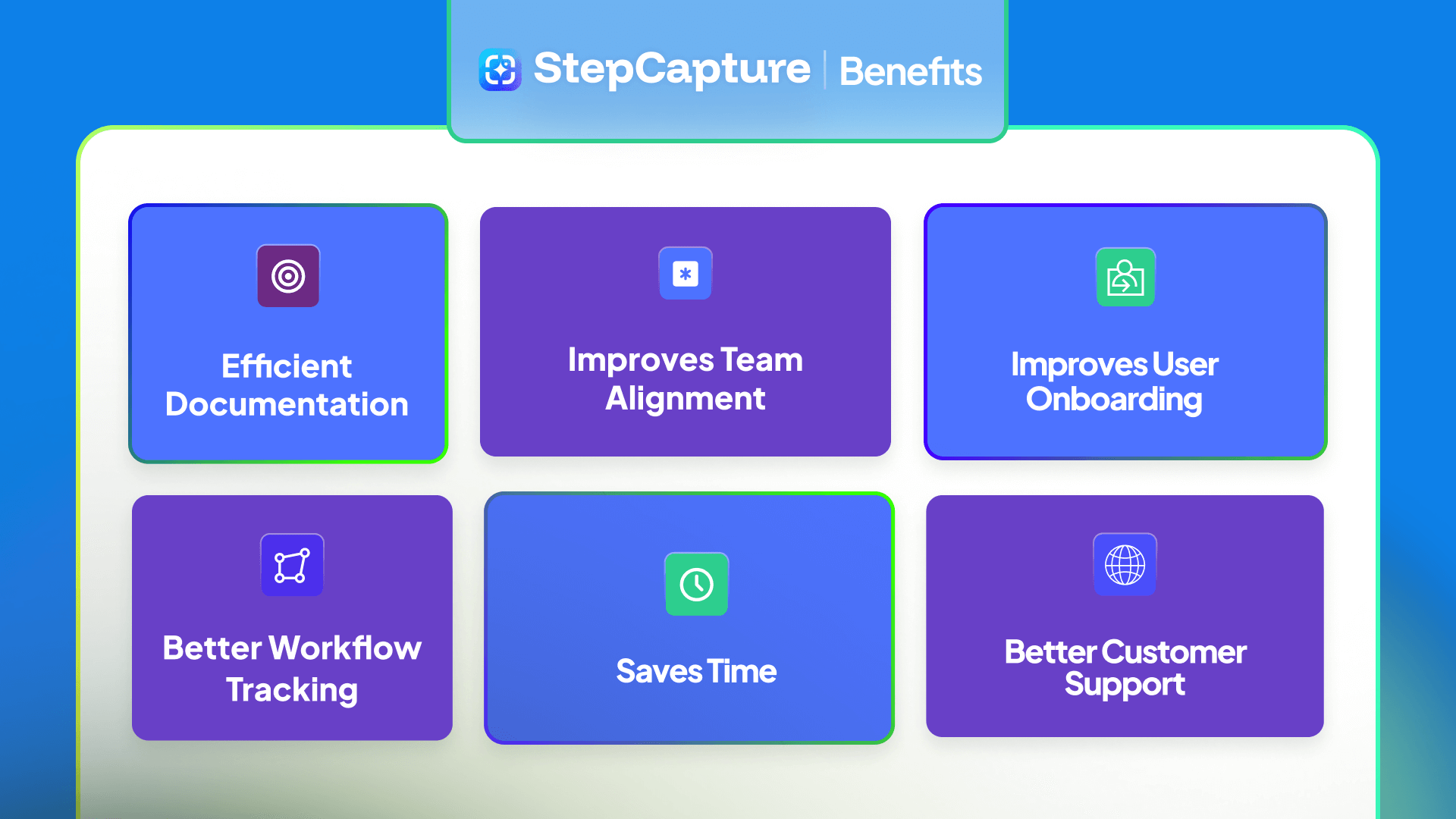
Here are a few reasons to choose StepCapture to create your product demos:
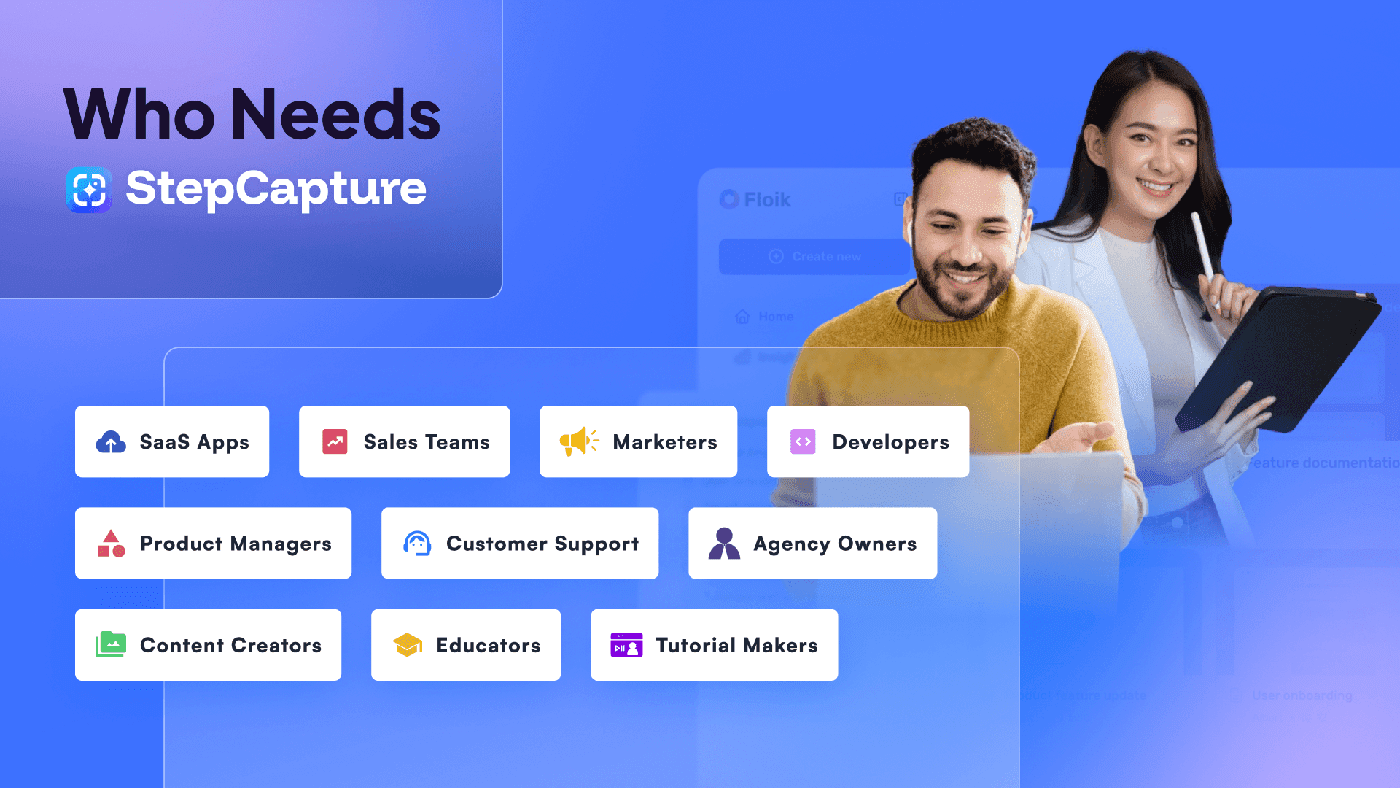
StepCapture can be used by:


01 Customer(s) recommended this item

StepCapture is a new offering in a highly crowed space. I’ll state at the outset that I’m a user who uses this mostly for tech support and helping people accomplish things directly vs as a broad tool for creating SOPs. As such, I’ve not used things like the AI features as much and have focused a lot on the user experience. Here a few things have stood out to me:
1) use of the Chrome plugin makes capture and creation of the guides very easy. Once I understood how to use the tool, it was extremely simple to quickly create and share guides.
2) Sharing is a core feature. This tool makes it very easy to collaborate and share. I have not used these features much as I am making guides that I share directly with people, but for those that need strong collab. features; it’s clear that this area is one of the most advanced parts of the offer.
Areas for improvement:
1) Certain aspects of the onboarding process are, somewhat ironically, using a different tool than StepCapture. One example is when the tool takes you to a screen to show you how to start your first capture, it’s showing you an animation of where to click and what happens. It’s really helpful and useful; unfortunately that’s not what StepCapture does. Perhaps this is a roadmap feature (I would love to see it) but it was a bit confusing to go through their onboarding process explained in a tool that isn’t the one that’s been created with a use case of onboarding people.
2) The defaults for where a user clicks in the images shown are a light blue circle. There are some options to change the color and to make it a box around the element instead (great options I was glad to see) but other options would also be welcomes (some other tools have a hand that moves to the element and clicks for instance).
3) Privacy features also are there from the start. The ability for fairly different types of blurring to be done (and my understanding is that there is more on the roadmap) really help with preserving privacy and helping with common guide tasks like logins into systems or protecting things like private URLs.
Suggestions:
1) ability to capture animated GIFs as well as just static images
2) ability for a person to narrate what is happening (for audio track, speech to text translation for copy, or (ideally) both)
3) ability to edit the images taken (the editor does let you open the images but at present I couldn’t find any editing features such as putting text call outs, added boxes, added blurs, etc. on the image)
4) image zoom and cropping would really help focus users of the guides on the area that is most important, sometimes with a big screen and a lot of data on it, it can be very hard for the user to see the section you really want them to focus on
5) some of the user experience pieces could probably use some fresh eyes. For instance, I’m not sure why the chrome plugin and the web app use different icons for accessing settings but it had me wondering what some of the buttons were for till I clicked them. Similarly, things like pressing the “home”(?) button on the chrome plugin makes the sidebar go away, I was expecting it to take me back to the main screen, not close it but apparently I need to click on the left facing chevron to go back to the main screen, Little things like this aren’t a huge deal but it will help users if there is a consistency in experience and look in them to what they are used to.
All in all, this is a fine effort and a great V1 with a lot of really good things on the roadmap and two very impressive founders. I’m happy I bought it and I’m hoping that they continue to improve the offer as I think it could be really great and the last tool I really liked just got acquired (so I’ve had to search for a great new tool).

Only logged in customers who have purchased this product may leave a review.
Got a Question? Ask here.

Always interested in these types of tools. This market is pretty saturated and some of the competitors are pretty sophisticated and full-featured. How is StepCapture distinguishing itself?
Hi, This is Nafiul from StepCapture.
You’re absolutely right, it’s a competitive space, and tools like Tango and ScribeHow are doing a great job.
But once you sign up and try StepCapture, you’ll feel the difference.
We’re focused on simplicity and speed, solving one core problem, helping users create fast, clean, shareable workflow documentation with zero friction. No bloat, no unnecessary complexity, just what you need to get the job done.
And we’re just getting started. A standout feature we’re working on is “Guide Me”, which will let users follow step-by-step instructions directly on the live website, making documentation not just readable, but usable.
Our goal? Compete head-on with the top players by staying laser-focused on usability and real-world needs.

What do you mean by “1 domain” in ex tier 1?
Can the domain be changed?
How will it look? etc
You can change the app.stepcapture.com domain to your custom domain. Here is how it will look on the app: https://cln.sh/6KDhskZHH4yxFkrW20P3
It will allow you to change the app.stepcapture.com domain to your custom domain when you share any capture.

Hey. Can I export the SOP as a long scroll HTML code so I can create a native page wherever I want without the need to rely on your embed feature? Thanks
We are working on this export feature and will ship this in next 2 weeks. You can able to find this on our roadmap: stepcapture.com/roadmap
Is there any plan to add the ability to have more than one domain, by chance? In this case, it would be the ability to generate documentation for clients.
We do not have any plans to allow users to add more than one domain to a workspace. However, if you want, you can create multiple workspaces and connect multiple domains (Tier 2 and Tier 3 plans).

May I ask why I am required to upgrade for Upload Logo and Upload Favicon?
Hey Pika, Nafiul from StepCapture. Sorry for the small mistakes on our end. We have already resolved this issue. Please check the branding now; you will have complete branding access.
Sorry again for the confusion, and thanks for purchasing the deal. Let me know if you have any other questions; I would love to help you out.

Hi,
When you describe the new feature you are working on “Guide Me”, will this be similar to the Tango walkthroughs feature? Cause that will make this a must-buy.
When you say one domain – that would be my domain for sharing but can I do walkthroughs on multiple client websites or can we only do walkthroughs on one site?
What is a workspace?
Also, you guys just started this year, how do we know this product will be around in the future?
Thank you.
Hi Eric,
Great questions! Here’s a quick breakdown:
Guide Me” Feature:
Yes, it’s similar to Tango’s walkthroughs. Users will be able to follow step-by-step instructions directly on the live site. It’s one of our most exciting upcoming features.
One Domain Explained:
“One domain” refers to your custom sharing domain (CNAME). You can still create walkthroughs for any website or client — there’s no limit on where you capture.
What’s a Workspace?
A workspace in StepCapture is essentially a dedicated environment where you can manage your documentation projects. It allows you to organize and separate different sets of guides or walkthroughs, which is especially useful if you’re working with multiple clients or projects. We are also going to add guest access to each workspace, which will allow you in the future to invite clients.
Will StepCapture Stick Around?
We launched this year but have years of SaaS and agency experience. We’re fully committed to building this long-term — and growing fast with input from early users.
Thanks again for the thoughtful message!
Would I be able to use 1 workspace with multiple clients? So instead of inviting them to a workspace, can I just email them their walkthrough and they will only have access to the one I created for them?
Yeah, you can do that. To make it work better, we are also pushing an update that will allow you to share a specific folder, and they will see all the captures in that folder (with password protect if needed). Also, if you want, you can invite your client as a guest and allow them to check only specific folders as well.
Both features are under development, and we are planning to ship this early next month. Please keep an eye on our roadmap for that.
Is it possible for you to change both T1 and T2 to correspond to the Ultimate plan, so that the only difference is the team size?
This is because I just discovered that your Ultimate plan has a “Create Page With Captures” feature, which I am very interested in, but I am the only one using it.
If you could make such changes for RocketHub users, it would be greatly appreciated.
Hey Pika,
Here are all of your questions’ answers:
1. Currently, RocketHub doesn’t allow upgrading the account. However, we have contacted the RocketHub team, and here is the process to upgrade the account. Just send an email to the RocketHub team ([email protected]) stating that you want to upgrade to a specific tier, and they will send you the payment link. Once you complete the payment, they will send you a redeem code that you can use from your workspace settings > subscription to upgrade your account.
2. Yes, the “create page with captures” feature is available to all the LTD plans, and thanks for bringing this up. We will make sure this is added to the LTD page soon.
3. Basically, if you purchase Tier 2 or 3, you will get all the current and upcoming features we launch on StepCapture, except for the “enterprise features.”
Please let me know if there are any other questions, and keep an eye on our roadmap. We are pushing some key features in the coming weeks.
Thanks,
Nafiul from StepCapture
Hello, I’m even more confused now. So, what are the differences between your T1 and T2 besides the team size?
So, you can’t make T1 correspond to Ultimate but with only one member and workspace?
If I directly purchase T2, can I get a refund for T1 and provide the serial number for you to manually upgrade it for me?
Sorry for making things confusing for you. Here is a simpler process for you.
1. T1 doesn’t have the custom branding options (add company logo, icon, and brand color from the workspace settings page). We had a small issue and updated it, and now you can see on your workspace branding page that T1 has locked down custom branding features. T2 and T3 do have all the features and also support a bigger team size. Lastly, T3 will have a “create page with multiple captures feature” in the future.
2. Yes, please purchase T2 and refund T1. This will work as well. Also, if you want to use the same email to register as a T2 account holder, then you can quickly delete your old account and create a new one using the T2 purchased redeem code.
I am really sorry for making things complicated for you, and the RocketHub deal page will be updated later today. Please let me know if you have any other questions.
Today, I’m here to make a suggestion.
May I ask if it’s possible to add a speech button at the end of the description text for each step, and then have the text read aloud through TTS?
If possible, it would be great if the voice could be from OpenAI or ElevenLabs.
Thanks.
Hi Pika,
Thanks for the suggestion.
Currently, we don’t have any plans to add the audio track or speech-to-text feature yet, but we are adding this to our feedback page, and we will definitely check how we can plan this to get it working while maintaining our core vision about StepCapture.
You can vote and leave your feedback here; this also helps us understand which features we should focus on: https://app.stepcapture.com/user/feedback
Thanks
Hi Pika,
Thanks for the suggestion.
Currently, we don’t have any plans to add the audio track or speech-to-text feature yet, but we are adding this to our feedback page, and we will definitely check how we can plan this to get it working while maintaining our core vision about StepCapture.
You can vote and leave your feedback here; this also helps us understand which features we should focus on: app.stepcapture.com/user/feedback
Thanks

It’s available also in italian?
Unfortunately, we don’t have support for different languages yet, but you can use StepCapture in English.

I believe all plans have AI, what is the advanced AI please?

Hi,
ist ist possible to set a wider preview width of the screenshots? On higher resultion displays, you can´t see the hotspot.
Also a pulsing hotspot would make it more visible. Small screenshot and small hotspot arear makes it hard to see where I have to click.

Hi Adam,
First of all, thanks for taking the time to write a detailed review. Also, thank you for checking our roadmap and sharing your thoughts on it.
We are glad to hear that you liked the product. We are very focused on what we are doing. We are not planning to add too many features that will make the product hard to understand and use, but we are definitely taking user feedback and planning how we can add user-requested features while maintaining our core vision.
Here are some replies to your feedback and suggestions so that you and others can understand that we are actively working on the product:
1. Yes, we are actively working on the extension to add more blur options, and in the future, we will have blur fine-tuning as well.
2. Yes, we are going to add the ability to add custom images and GIFs from the capture edit page by the end of April 2025.
3. We don’t have any plans to add the audio track or speech-to-text feature yet, but we are adding this to our feedback page, and we will definitely check how we can plan this to get it working while maintaining our core vision about StepCapture.
4. The auto zoom and step image opening in a lightbox (popup view) feature is going to be added next week. Also, thanks for reporting these UI feedback; these will be fixed as well by the end of next week.
I know we are in a very crowded place and have a lot to do to catch up with others, but the way we are thinking about StepCapture is very different from all the other competitors. We have lots of cool features on our roadmap that we will ship in the coming months, especially like the Guide Me, Pin Captures, and the Create Page with Captures features. These features will help teams like yours share and follow processes much faster and better.
I would love to know your feedback after we launch these core features. Until then, please use StepCapture and share any other feedback or improvements that you think need to be made before you and your team use StepCapture as your go-to tool for documenting processes.
Thanks,
Nafi from StepCapture