
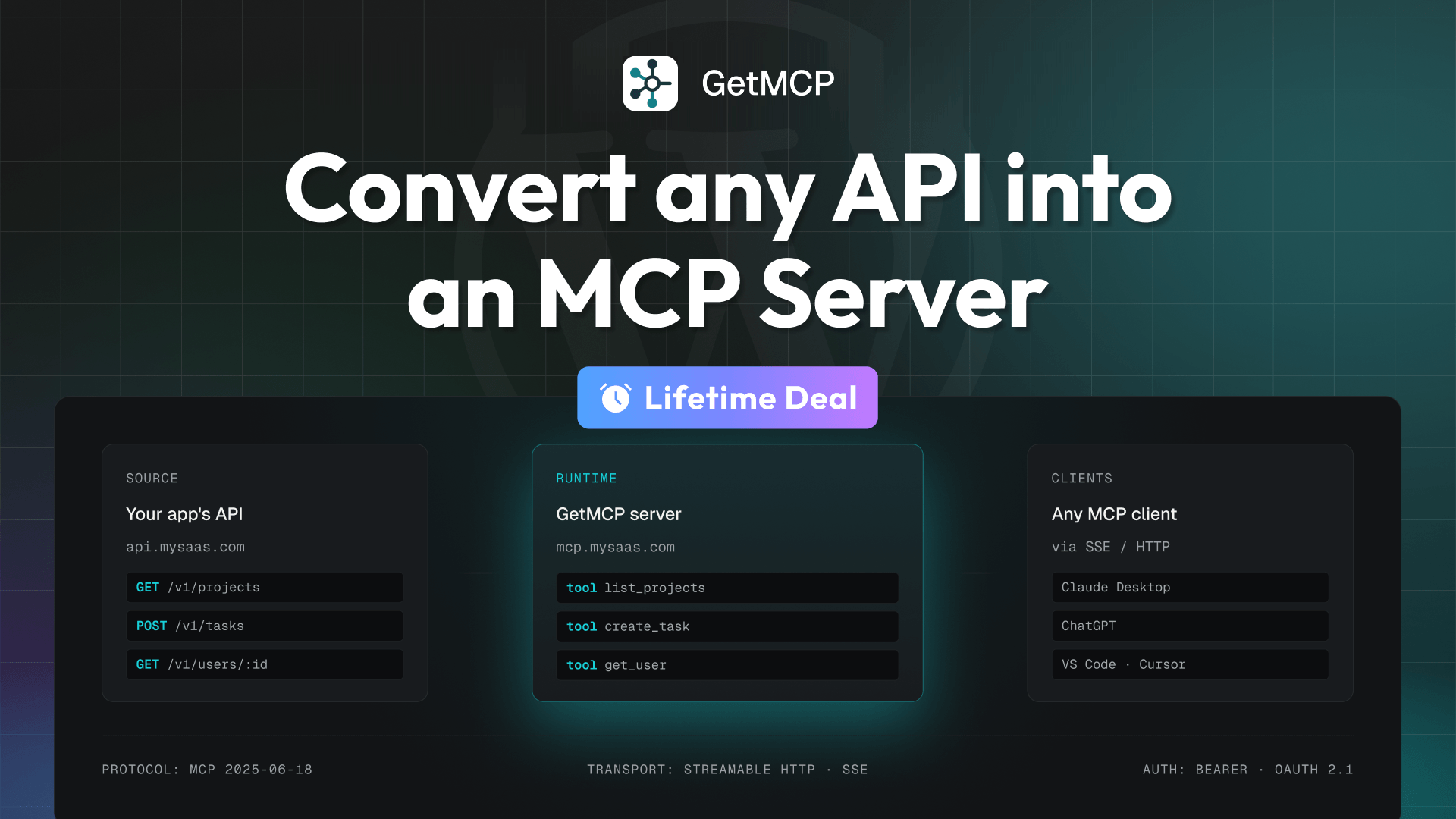
Start deploying it in 4 easy steps:
1. Drop the plugin on any WordPress site: Activate GetMCP on a subdomain like mcp.mysaas.com. No separate server to provision.
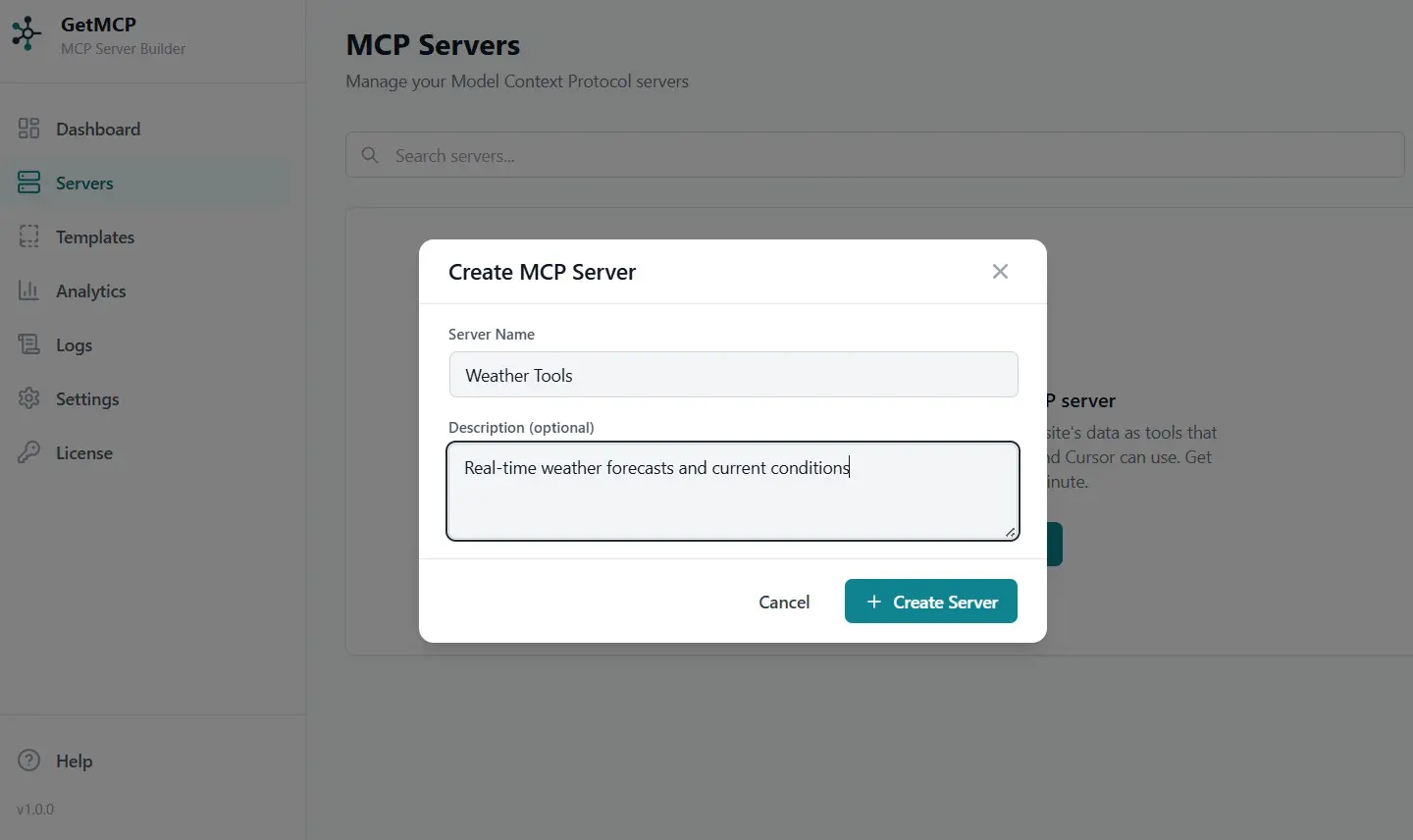
2. One namespace per product or tenant: Define the server URL and auth strategy. Spin up separate servers per customer or environment your global per-client rate limit applies to each.
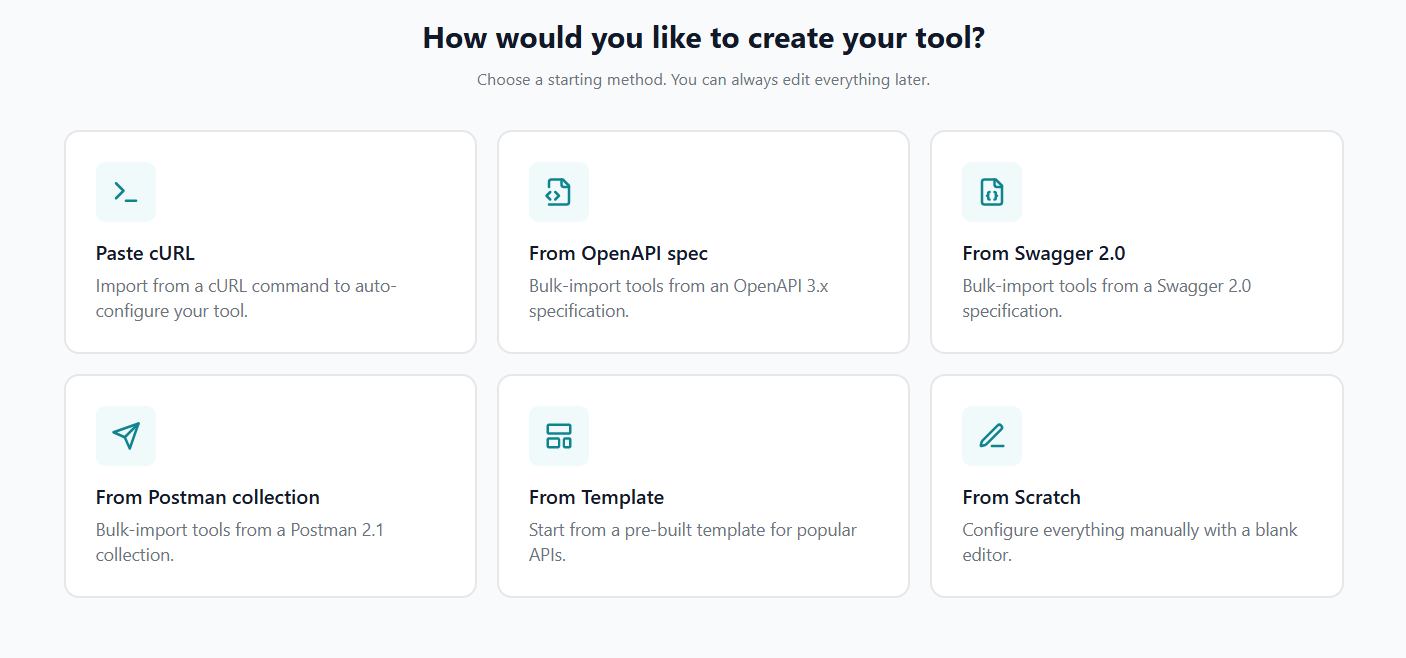
3. Paste a cURL, upload an OpenAPI file: GetMCP parses your existing API definition and generates MCP tools with schemas, descriptions, and parameter validation.
4. Users connect from any MCP client: Ship one URL to customers. They add it to Claude, ChatGPT, VS Code, or Cursor and your app is suddenly AI-native.



23 Customer(s) recommended this item

The fact that you can launch this right from WordPress is actually pretty amazing, though you will have to make sure that your security allows the connection. But getting installed is super quick and there definitely are some things that I will have to brush up on and could help some guidance on but overall, this experience of setting up an MCP server is 10 times easier than my path of learning how to do so manually. Great tool for agencies that want to add another offer to their stack, or anyone that really wants to integrate their stack with their AI, or anyone that wants to really dig into the power of MCP’s and how they are part of the shift in the new economy and infrastructure they are setting up for how AI will engage with data, online resources, and services via the agentic economy. MCP’s are the gateway to give AI the tools to use your data and even, more and more, for the future of the agentic economy of gas fee and tokenized services.

Picked up GetMCP to connect our internal tools, and the initial setup was surprisingly fast.
Probably saved me hours of configuration work.
Looking forward to expanding our usage and future features.

I recently purchased GetMCP, and I’m really impressed! This application makes it super easy to create MCP servers for APIs, even if you’re not a tech wiz. I have many applications that have API access, and not MCP. This just brought them to life. I imported my endpoints in JSON format, made some adjustments and now my AI agent can access data that it could not before. I have been looking for this type of integration for a while. I created a mcp server to access api endpoints to a database I manage. I also created a mcp server to connect to my google sheets that I have api endpoints for.
I am using the WordPress integration, and the stand alone application. Both work equally well.
Overall, I highly recommend GetMCP.com! It’s a fantastic tool. Keep it up!

Many LTD tool just provided API. For me , Reoon Email Verifier, Now i can connect it to google spark via GETMCP. that is so great for me to outreach the leads.

I’ll be honest, I didn’t think our team would ever get to where somebody could hang up a sales call and not have to go touch the CRM after, but here we are. We used GetMCP to connect Claude to our financial planning software and our CRM for our fiduciary practice and it’s changed how our day to day runs. Our producers and processors, the people actually doing the work inside the company, just talk to Claude in the chat and it organizes their tasks, keeps their work straight and gets things done. Sales calls get transcribed and everything gets organized and updated right from the chat, nobody is retyping notes into three different places anymore. It is working fabulously and our clients are beyond impressed with it. If you’re in financial services and still moving information from one system to the other by hand, get… Get MCP.

Claude hooked up a bunch of Google APIs for seo and site monitoring and I added the WordPress management API. And now it’s all done from the comfort of the LLM. No need for a million tabs open. Fantastic.

I’ve been using FlowMattic, and it’s a solid automation platform. Now, with GetMCP, I can build full-stack AI workflows and connect SaaS platforms with APIs to AI agents seamlessly.
Both FlowMattic and GetMCP are incredibly powerful, reliable, and easy to use. They make automation and AI integration far more accessible, opening up countless possibilities for businesses and creators.
The founder is trustworthy, highly responsive, and genuinely committed to supporting users and improving the products. Thank you M Yawalkar and the Team for creating such outstanding products, keep up the excellent work! I highly recommend both FlowMattic and GetMCP. Cheers!

I just updated to GetMCP 1.6.0, and the new MCP Gateway alone was worth the upgrade. Instead of adding every single server URL to Claude and Cursor individually, I now have one endpoint that exposes all my tools at once. Build a new server next month and it just shows up – no more copy-pasting connector settings.
The database connector is a huge win too. I pointed it at a PostgreSQL instance and within minutes I could ask Claude to list tables, describe schemas, and run queries. It starts in read-only mode at the database session level, and write tools come switched off, so I actually feel safe experimenting with it.
Quick Connect is another nice touch – adding a server to Cursor is literally one click after it checks that everything will actually work. And the expanded WordPress template finally lets me update existing posts, which is exactly what I needed.
Overall, 1.6.0 removes a ton of friction without making me nervous about what the AI might accidentally do. Highly recommend it if you’re managing more than a couple MCP servers.

GetMCP turns the tedious part of connecting API super easy especially for legacy APIs and those tools that the developers have no plan of releasing their own MCP servers. It really opens up lots of possibilities that I previously won’t spend time digging into. It got even more awesome releasing a standalone version after listening to the users feedback! I believe the tool will be improved further as I’m following the changelog closely. I have the same level of trust in the team behind FlowMattic, which I own the LTD as well.

I’ve only tried GetMCP once so far, but my first experience was good. What I like most is that it isn’t limited to WordPress. I can also install it on my own server.
Setup was much easier than I expected. I gave it my API documentation, and it handled the MCP configuration for me. That made the hardest part of setting up MCP feel simple.
I’ll test it again in a month, but based on this first trial, GetMCP has done a good job.
Only logged in customers who have purchased this product may leave a review.
Got a Question? Ask here.
Can I import my project from Github?
Great question! A quick clarification on how GetMCP thinks about imports: it doesn’t import your code or repo — it imports your API definition, and turns that into an MCP server. So nothing to clone or deploy from GitHub.
If your GitHub project has an OpenAPI/Swagger spec or a Postman collection in the repo, you’re one step away — three ways to bring it in:
1. Fetch from URL — open the spec file on GitHub, click “Raw”, and paste that link into GetMCP’s import (Tools → Import → Fetch from URL). Works great for public repos.
2. Upload the file — download the spec from your repo and upload the JSON/YAML directly (use this for private repos).
3. Paste it — copy the spec contents straight into the import box.
GetMCP parses it and generates MCP tools with schemas and validation for every endpoint — you review, enable, and you’re live.
And if your project doesn’t have a spec at all? Paste a cURL command for any endpoint and GetMCP builds the tool from that. 👍
1. No unlimited sites offer?
2. Doesn’t flowmattic already do the connection between sites and MCP why would we pick this over flowmattic I struggle to see other than the fact its newer, and you get a lot more activations why pick this over flowmattic when you can get a flowmattic lifetime?
3. Whats the product roadmap how will this grow?
4. In testing how many tools have been tested on a typical site
5. Hosting requirements?
Love these questions — let me take them one by one. 🙂
1. No unlimited sites?
We deliberately capped the top tier at 200 activations. Unlimited + lifetime is the combination that kills lifetime deals — it invites seat reselling and makes support quality collapse for everyone who bought honestly. 200 sites is “unlimited” for any real agency, and it keeps this deal something we can support properly for years.
2. Why GetMCP when FlowMattic has MCP?
They’re built for different things. FlowMattic’s MCP server is tied to the integrations FlowMattic ships, and it’s for your personal use — your AI assistant working with your own connected apps and workflows. GetMCP has no such boundary: point it at any REST API and build MCP servers both for yourself and as an app developer for your users. Your SaaS customers, your agency clients — each gets their own MCP server URL, with its own auth (API keys, OAuth 2.1), per-client rate limits, call logs, PII redaction, and response shaping. In short: FlowMattic’s MCP is a feature for you; GetMCP makes MCP something you can ship to others. Plenty of people will happily run both.
3. Roadmap?
Good timing — we’re putting the finishing touches on a public roadmap right now, and it goes live within the next 24 hours. I’ll drop the link here as soon as it’s up, and you’ll be able to see what’s shipping next and vote on what matters to you. Meanwhile, judge us by the pace so far: 1.0 shipped the visual builder, four import formats and OAuth; 1.1–1.3 added the Chat Playground, JMESPath response pruning, PII redaction, and same-week support for the latest MCP spec (2026-07-28). The core promise doesn’t change: when the spec moves, GetMCP moves with it — and lifetime buyers get all of it.
4. How many tools tested per site?
The whole team hammered on this before launch, so I can’t give you one exact number — but here’s the scale: we created 40+ MCP servers in testing, totalling 350+ tools across them, and ran each server on different machines with roughly 10–15 MCP test runs per server. There’s no hard cap on tools — each one is a stored definition served on discovery, and each call is a single HTTP request. In practice the ceiling is the AI client’s context window, not GetMCP — which is exactly why the pruning and redaction features exist. Best practice: group tools into focused servers per product area rather than one giant catalog.
5. Hosting requirements?
If it runs WordPress, it runs GetMCP: WordPress 6.2+, PHP 8.0+, HTTPS. No Node, no containers, no external services — the MCP transport is plain HTTP served by your existing stack. We recommend a subdomain install (mcp.yourdomain.com) to keep it tidy. A modest VPS or decent shared hosting handles thousands of tool calls a day, since each call is just a lightweight JSON-RPC request plus your API’s own response time.
Will this be limited to WordPress only? Will this be open to other CMS like Astro, Wix, Webflow in the future?
We do have plans to expand GetMCP in future based on demand, however, the current offering is for WordPress only
Are there any plans on the roadmap for a stand-alone, self-hosted (Docker?) solution instead of requiring
WordPress?
Yes, we do have plans to expand GetMCP to be available as pure self hosted version as well, but we don’t have any ETA on that. Currently we are focusing on the WP Plugin only. Though GetMCP is a WordPress plugin, it needs WordPress as backend framework only 🙂
1. How GetMCP handles the security part? Like storing/passing MCP credentials? Logging? Underlying WP security concerns?
2. How do I upgrade from Tier to Tier, such as from Tier 4 RH Agency Plus to Tier 5 RH Agency Max?
Excellent question, Bryan! — security was a day-one design priority, so let me give you specifics rather than marketing-speak.
Credential storage:
-> All credentials — API keys, OAuth tokens, auth secrets — are encrypted at rest using libsodium authenticated encryption (XSalsa20-Poly1305 AEAD), with keys derived via HKDF-SHA256 from your WordPress salts. Not plaintext, not weak hashing — real authenticated encryption with a random nonce per value.
-> The plugin refuses to store credentials at all if the encryption stack is unavailable or your WP keys are weak — it fails safe, never falls back to plaintext.
-> Credentials never enter the AI’s context. GetMCP injects them server-side when calling your upstream
API — Claude/ChatGPT never see or hold your keys. And the inbound MCP token a client presents is stripped before the upstream call, so it can never leak to the external API either.
How AI clients authenticate to your server:
-> Full OAuth 2.1 — PKCE mandatory (S256 only), exact redirect-URI matching, single-use auth codes, short-lived access tokens with rotating refresh tokens, all hashed in the database. This is the current MCP auth spec, implemented properly.
-> Or per-server API keys — generated with a cryptographically secure RNG, stored only as SHA-256 hashes, shown once.
-> Failed auth attempts are rate-limited per IP, so brute-forcing credentials gets expensive fast.
Logging:
-> Call logs are HMAC-signed and append-only, with a daily integrity verification — tamper-evident logging, which matters if you ever need audit trails for compliance.
-> Configurable PII redaction (emails, cards, SSNs, phone numbers, IPs, AWS keys, JWTs, plus your own custom patterns) — applied both before logs are stored and before responses reach the AI client.
-> Sensitive argument fields are sanitized before logging; full request/response bodies are only logged if you explicitly opt in.
-> Retention is configurable (30 days default, auto-purged).
WordPress-level concerns:
-> Every REST route is capability-gated; every database query is prepared — no SQL interpolation anywhere.
-> Public MCP endpoints get body-size caps, per-IP rate limiting, IP allow/blocklists, and default-deny CORS.
-> Outbound requests are SSRF-checked, size-capped, and time-limited.
-> And the bigger picture: this is self-hosted. Unlike cloud API-to-MCP converters, your API keys never sit in someone else’s multi-tenant database. Your keys, your server, your rules.
Security questions are always welcome — happy to go deeper on any of this. 🙂
About upgrade from Tier to Tier – reach out to RocketHub while the deal is live.
hi. top tier gives option for 200 sites. after I use GetMCP for one site and let’s say after some time decide to delete the whole site, will that used seat credit goes back to me for my 200 sites allowance? in order words, can I use those 200 sites limit allowance again and again, as long as I delete the site and reinstall again in the future?
Yes, the limit of 200 sites is for the number of active sites. So as long as you delete GetMCP from a site ( no need to delete the site if you don’t want to ), just make sure you deactivate the license from that site, so it will be credited back to your sites quota 🙂
This was a no-brainer for me, not because I need 200 activations, but just like Flowmattic: once I have it I will find 1000s of ways to get it to work for me, and I like increasing my stack from trusted developers. It goes without saying flowmattic has been one of my best purchases ever.
A couple of questions / Comments from me:
1. I have made some assumptions here because its wordpress based, I can literally write my own APIs on my own sites and connect them to a single MCP and it would give me a tool for them, so for example, a plugin that allows me to remotely run wp-cli commands like update all, it doesn’t need to be an exsisting saas.
2. The ability to set usage limits within our installation would be useful, and filters and hooks to allow us to override them and monitoring them would be useful. This could open up additional front-end credits and usage limits, so for example, for my agency customers, I could allow so many tokens of access in their package for tools i write.
3. I can finally add an MCP to the Gridpane I control, so thanks for that
Thank you so much! 🙌 And hearing that FlowMattic has been one of your best purchases really means a lot to us. We really appreciate the trust.
1. Yes, and there are actually two possibilities here. GetMCP already has WP-CLI support for managing servers, testing tools, managing API keys, health checks and more. For your example of remotely running your own WP-CLI operations, you could create a secure REST endpoint for the specific operation and turn that into an MCP tool. Expanding WP-CLI support further so even more of GetMCP can be managed programmatically is already on our roadmap.
2. The usage/credits idea goes beyond our current rate limiting, and we really like it. Today you can configure rate limits at the server and tool level, but customer-level credits or usage allowances — especially with hooks/filters so agencies can build their own packages around them — is a great idea. We’ve added this to our roadmap for consideration.
3. And yes, GridPane is a great fit for the self-hosted model. Your infrastructure, your APIs, your MCP server and your data all stay under your control. 🚀
Really appreciate the detailed ideas. The agency usage/credits model in particular is something we’d love to explore further.
Sorry for that beginner question but I don’t quite get the WordPress Part.
Is WordPress in that case just like the “hosting” environment that is required for your tool to work?
Let’s say I vibe code an app that is hostet on Vercel or netlify and I want it to have MCP support so that anyone who uses it can ask claude code to do something in my app. That is possible to archieve, correct?
Or is it just for WordPress Plugins?
And is it relying on the RestAPI then? Or how does it handle requests?
Not a beginner question at all — and yes, you’ve understood it correctly.
Your app does not need to be built on WordPress. If your app is hosted on Vercel or Netlify, it stays there exactly as it is. With the current version, WordPress acts as the backend/runtime where GetMCP runs.
However, we’re releasing the standalone version of GetMCP this week, which will be a much better fit for setups like yours. You’ll be able to run GetMCP separately without needing a WordPress installation, while your existing app continues to stay on Vercel or Netlify.
And yes, GetMCP works with your app’s REST API. You choose which API endpoints you want to make available as MCP tools. When Claude uses one of those tools, GetMCP sends the corresponding request to your app’s API and returns the result back to Claude.
It is definitely not limited to WordPress plugins or WordPress APIs. Your application can be hosted elsewhere and built with any stack, as long as it has the API endpoints you want to use.
And since you mentioned vibe coding, our next update should be especially interesting for you. You’ll be able to give your API documentation to your AI assistant and have it help create and configure the MCP server in GetMCP — making the whole setup much easier.
So yes — your Vercel/Netlify app example is exactly the kind of use case GetMCP can work with.
Hi, I like to know what a site ist.
For example I have one app that I like to run with MCP, how many user could use my app via MCP and can I limit the rates for each user?
Could I offer MCP usage to unlimited user with one site?
Sure! A site means one GetMCP installation, not one user or one MCP connection.
For example, if you install GetMCP on mcp.yourapp.com, that counts as 1 site. From that single installation, you can create your MCP server, add multiple tools, and allow your app’s users to connect to it. You do not need a separate site/license for each user.
So yes, you can offer your MCP to many users from the same GetMCP site.
Regarding your second question: if you’re asking whether you can give each individual user their own quota, for example:
User A → 100 requests/day
User B → 500 requests/day
User C → 1,000 requests/month
GetMCP doesn’t currently provide per-user quotas like this. The current rate-limiting controls are available at the server and tool level, rather than separately for each user.
So in short: one site can serve many users, but individual per-user usage quotas aren’t currently available.
How do we upgrade from Tier 5 to Tier 6?
About upgrade from Tier to Tier – reach out to RocketHub while the deal is live.
Hi, I am evaluating the RocketHub lifetime deal and I am considering using GetMCP commercially, running servers on behalf of clients as a paid service. Before I buy I have some questions that the website and the deal page did not fully answer. Some of them decide which tier makes sense for me, so I would appreciate direct answers even where the answer is “not yet”.
Licensing and site slots
1. Does the license allow commercial use, meaning I install and operate GetMCP for paying clients and charge them for it?
2. What exactly counts as one “site”? A domain, a physical installation, or an activation record?
3. If a client leaves and I deactivate that install, does the slot return to my quota, or is it consumed permanently?
4. Is there a limit on how many times I can deactivate and reactivate slots?
5. Can the license be transferred to a client if they later want to take the server in house?
6. Do staging and development installs consume a slot, or is there a non production exemption?
7. The RocketHub Agency Unlimited tier goes beyond your highest retail plan, which tops out at 25 sites. What does “unlimited” map to if your plan structure changes later?
Multi-tenancy, and this one decides my tier
8. Can a single installation serve multiple separate clients, each with their own servers, credentials and isolated data, or does each client require its own installation?
9. If one installation can host many tenants, is there any hard limit on servers per install?
10. Can I give a client access to only their own server, without seeing anything belonging to other clients on the same install?
11. Are rate limits configurable per tenant, or only globally per install?
Authentication, my biggest open question
12. Your homepage lists OAuth 2.1 and per tool scopes, but the FAQ on both sites only describes bearer tokens that the end user pastes into their client headers. Which is it, and are both supported?
13. If OAuth 2.1 is supported, does GetMCP act as the authorization server, or does it delegate to mine?
14. Do you support dynamic client registration? Remote connectors in Claude and ChatGPT generally expect it, and without it my clients cannot offer a one click connection to their own users.
15. Can I map OAuth scopes to specific tools, so different user roles see different toolsets on the same server?
White label and client experience
16. Can the admin interface be rebranded, meaning my logo, my colours, no GetMCP branding, when a client logs in?
17. Is there a read only or client role, so a customer can view their own logs and analytics without being able to change tools?
18. Can the MCP server URL live entirely on the client’s own domain with no reference to GetMCP?
Scale and infrastructure
19. What is the realistic ceiling for concurrent requests on a standard VPS, and at what point should I move from SQLite to MySQL or PostgreSQL?
20. Logs store request and response payloads. How fast does the database grow at, say, 50,000 calls per month, and is there automatic pruning?
21. Is there anything that breaks when the same server runs long running or slow upstream API calls, for example timeouts I should know about?
22. Do you have any customers running this in production at meaningful volume, and can you share rough numbers?
Data and GDPR
23. I am in the EU and would be acting as a data processor for my clients. Do you provide a DPA, and is there any telemetry, licence check or phone home that transmits customer data or usage details to your servers?
24. The changelog mentions PII redaction in v1.3.0. Where does that apply, on logs only or also on responses passed back to the model?
Tool quality and responses
25. How does JMESPath pruning work in practice, and can I shape or trim a response per tool so large API payloads do not flood the model’s context?
26. When I import an OpenAPI spec with 80 endpoints, can I select a subset rather than generating everything?
27. Can I edit generated tool names and descriptions freely, and are those edits preserved when I re import an updated spec?
28. Is there any versioning or deprecation flow, so I can change a tool without breaking clients already connected to it?
Company and continuity
29. What is your release cadence, and what is your commitment on how quickly you ship support for new MCP protocol revisions?
30. Given the free tier and a 99 dollar annual plan, how do you fund support for a large number of lifetime licence holders?
31. If the product is discontinued, does the licence become perpetual and self hostable, or do installations stop working when the licence server goes away?
32. Is there a partner or agency programme beyond the licence itself, for example referrals, listings or co marketing?
Hi, thank you for taking the time to write all of this up — this is one of the most thorough evaluations we’ve had. Since a few of these decide your tier, I’ll answer all 32 directly, including the honest “not yet” ones.
LICENSING AND SITE SLOTS
1. Yes. Commercial use is allowed — you can install and operate GetMCP for paying clients and charge them for it. That’s exactly what the agency tiers exist for. Nothing in the license restricts who owns the sites or whether you bill for the service.
2. An activation record, keyed to your license plus the normalized site URL. Scheme, www and default ports are ignored — https://www.client.com and http://client.com are one site. Subdomains and subdirectory installs count separately.
3. The slot returns instantly — we’ve tested this specifically. Deactivating a site frees its seat the moment the request lands; nothing is consumed permanently. One practical note: deactivate from the install before you destroy a server, because the release request is signed by the install itself. If a client’s server is already gone, contact support and we’ll release the seat manually.
4. No limit. No counter, no cooldown, no cycle cap. Move the license between sites as often as you like.
5. The key itself can’t be handed over — activation works through an encrypted key that is generated when the license connects to your account on our site, so the license stays tied to the purchasing account. What you can do is hand the entire installation over to the client: they manage their servers and everything keeps running as-is. The one thing to know: if they ever deactivate the license, reactivating it requires the license owner, so they’d need to contact you for that step.
6. Every activation counts — there is no staging exemption. In practice you rarely need one: the MCP server runs in the backend and doesn’t care whether the site is “production” or “staging”, so you can build and test against your AI client on the same install you’ll hand to the client. And since releasing a seat is instant and reactivation is unlimited (see 3 and 4), moving between environments costs nothing.
7. Unlimited means unlimited activations, and it’s live and working today. It’s enforced on your license record itself, not on our current plan catalog — so if we restructure retail plans later, nothing about an issued license changes. Features work the same way: every deal tier gets the full feature set (tiers differ only in site count), and the plan mapping is deliberately written so an unrecognized plan name never downgrades an active license. Worth knowing: the unlimited tier is only available in limited quantity through this deal — it doesn’t exist at retail.
MULTI-TENANCY
8. One installation is one admin realm. You can run any number of MCP servers on a single install — each with its own authentication, credentials, logs and settings — but there is no per-client admin isolation inside one install: anyone with admin access sees all servers. The model the site quota is built around is one install per client (their domain, their database, real data isolation), and the standalone app makes that cheap: one command on any VPS, SQLite by default, nothing else to set up. That’s exactly why the unlimited-sites tier fits what you described.
9. No hard limit. Servers, tools and calls are all unlimited on every paid tier — our own stress testing ran 10+ MCP servers on a single instance without issues (more in 22).
10. Not today — honest answer. Neither build has a client-scoped role that shows only one server. If clients need to see their own logs, the answer today is their own install (see 8), which gives them exactly that plus genuine data isolation.
11. Per server and per tool, plus a global default — not per end-user or per token yet. With install-per-client, per-server limits are effectively per-client limits. Each server’s limit is configurable (N requests per minute, or unlimited), and hitting it returns a proper 429 with Retry-After at the server level, or a JSON-RPC error with retry_after at the tool level.
AUTHENTICATION
12. Both, and it’s a per-server choice. Each server picks its client authentication: none, static bearer/basic (the pasted-header mode the FAQ describes — simplest option, the upstream API validates the credential), managed API keys, or full OAuth 2.1. The FAQ documents the simplest mode; the homepage describes OAuth — both are real, and OAuth 2.1 is what powers the one-click connector flow in Claude and ChatGPT.
13. GetMCP is the authorization server the AI clients talk to — it serves the discovery documents and the authorize/token endpoints and mints its own tokens (PKCE S256 required, no plain fallback, exact redirect-URI matching, single-use codes, rotating refresh tokens). For sign-in identity there are two modes: the built-in management server uses GetMCP’s own login and consent screen, and for your API servers GetMCP brokers to YOUR identity provider — you plug in your authorize/token URLs and client credentials, users sign in with you, and GetMCP handles both sides of the dance, storing upstream tokens encrypted and injecting each user’s own token on their API calls. What it doesn’t do yet is accept tokens minted by a third-party authorization server directly.
14. Yes. RFC 7591 dynamic client registration is live on every OAuth-enabled server (/oauth/register, advertised as registration_endpoint in the metadata) — exactly what Claude and ChatGPT remote connectors expect. We also support Claude’s hosted client-metadata documents, so the whole connector experience — paste URL, sign in, consent, tools appear — works with zero manual registration. Claude is what we test against most heavily.
15. Not as a UI feature yet. There is a per-tool scope hook (a one-line PHP filter, with a proper RFC 6750 insufficient_scope step-up challenge), but no admin-screen mapping of scopes or roles to toolsets. The supported pattern today for “different roles see different tools” is separate servers with different tool sets on the same install.
WHITE LABEL AND CLIENT EXPERIENCE
16. Not yet for the admin interface — there’s no white-label setting, so a client logging into the admin sees GetMCP branding, and the OAuth consent screen carries our mark. What your clients’ end users see is already yours though: your domain, your server name in the AI client, your server logo.
17. On the WordPress build, effectively yes: analytics and logs sit behind their own capability, so a role granted only the analytics capability (any role-editor plugin does it) gets read-only Analytics and Logs — deletion and settings changes are refused server-side. It isn’t scoped per server though (see 10). The standalone app is single-admin today.
18. Yes, entirely. The endpoint is https://client-domain.com/mcp/server-name, the OAuth discovery documents are served from that same domain, and the server name the AI client displays is whatever you set. The only GetMCP references on the wire are documentation links inside the OAuth discovery JSON — never seen by end users.
SCALE AND INFRASTRUCTURE
19. Every MCP call is a short, stateless request — no long-lived connections, no worker held open — so your ceiling is your PHP worker count times upstream API latency, and in practice the upstream API is the bottleneck, not GetMCP. Our stress testing ran 10+ MCP servers on one instance with 10-15 concurrent connections sustained for over 30 minutes without degradation, and throughput scales directly with the server configuration. On the database: the standalone supports SQLite (the zero-config default), MySQL/MariaDB, and PostgreSQL. SQLite is fine for a single client’s sustained traffic; move to MySQL/MariaDB or PostgreSQL when you have heavy concurrent write load — in practice, when you turn on full response logging on a busy install or push serious sustained volume through one box.
20. At default settings, 50,000 calls a month is a non-event. A log row stores metadata plus size-capped, credential-redacted arguments — roughly 1 KB a row, so on the order of 50 MB a month — and full request/response payload logging is off by default (it’s an opt-in debugging tool). Pruning is automatic: a daily job deletes call logs older than 30 days and analytics older than 90 by default, both configurable from 0 (keep forever) to 3650 days, and deletes run in chunks so a large table never locks.
21. Timeouts are per tool: default 30 seconds, maximum 300, with configurable retries and exponential backoff. Two things to know: there’s no streaming keepalive on a slow call — the AI client just waits — and your PHP process timeout is the outer bound, so keep tool timeouts under it. Practical guidance: most AI clients get impatient past about 60 seconds, so design tools to answer fast (the response shaping in 25 helps a lot) rather than proxying multi-minute jobs.
22. We launched publicly in August 2026, so I won’t pretend to years of production history or quote customer volumes we don’t have yet. What I can share is our own stress testing: 10+ MCP servers on a single instance handling 10-15 concurrent connections sustained for over 30 minutes without degradation — and since every call is a short stateless request, capacity scales directly with the server configuration. For track record: GetMCP is built by the team behind FlowMattic, which has been running automation workloads on customer sites for over 5 years.
DATA AND GDPR
23. The architecture is most of the answer: GetMCP runs entirely on your (or your client’s) infrastructure. MCP traffic, credentials, call logs — none of it ever touches our servers, so for your clients’ data we’re not in the processing chain at all. What our servers hold about an install is the site URL and the encrypted license key generated during activation; after that, the install periodically pings our update server to check for new versions — a version check only. No usage data, no tool or server names, no emails, no content, ever. We don’t have a formal DPA template published yet — tell us what your compliance process needs and we’ll provide the details.
24. Both, and it’s configurable. Redaction runs at two points: on the response before the model sees it, and on what gets written to logs (arguments, responses, error messages). Per server you choose both, response-only, or logs-only. Seven built-in patterns (emails, SSNs, credit cards, phone numbers, IPv4 addresses, AWS keys, JWTs) plus your own regex patterns with custom labels. Matches become labelled placeholders like [REDACTED:EMAIL] so the model keeps context. It ships off by default — enable it per server.
TOOL QUALITY AND RESPONSES
25. Every tool has a response mapping: full JMESPath (the real library, not a subset) or simple JSONPath, applied before anything reaches the model. So users[?active].{id: id, email: email} turns an 80-field-per-row payload into two fields per row. There’s a live test panel in the tool editor, and analytics tracks upstream bytes versus delivered bytes per tool, so you can see exactly how much context you’re saving.
26. Yes. The import preview lists every operation in the spec with checkboxes — select all or cherry-pick — lets you choose skip-vs-duplicate for name collisions, and imported tools land as drafts by default, so nothing goes live until you activate it.
27. Edits are fully free — names, descriptions, parameters, response mapping, everything. Re-import is honest territory: importing an updated spec never overwrites existing tools (it skips them, or creates duplicates you reconcile), so your edits can’t be clobbered — but there’s no update-in-place re-sync yet either. One caveat worth knowing up front: the tool name is what MCP clients call, so renaming a tool is a breaking change for already-connected clients — there’s no alias mechanism yet.
28. Partially. Tools have a draft, active, inactive lifecycle, and drafts and inactive tools are invisible to clients — so the working pattern is: create the new version as a separate tool, run both side by side, deactivate the old one when your clients have moved. Formal version history and a deprecation flag surfaced to clients don’t exist yet.
COMPANY AND CONTINUITY
29. The track record so far: 1.0 in mid-May, then 1.1.0 in June, 1.2.0 in July, 1.3.0 and 1.4.0 in August (the standalone app and the built-in MCP server) within the following weeks. On protocol: we support five MCP revisions today, from 2024-11-05 through 2026-07-28 (the current one) — implemented properly (stateless mode, batching removal, the new cache metadata), not just version-stamped. The MCP spec is this product’s foundation, so tracking it fast isn’t optional for us; every revision so far has shipped within weeks of publication.
30. Two things make the math work. First, both the app and the WordPress plugin are fully self-hosted — you run them on your infrastructure, so lifetime licenses add no recurring server cost on our side; support cost scales with documentation quality, which is why the knowledge base and install tooling get so much of our attention. Second, the free tier is deliberately minimal — it exists so anyone can test how it works — and the paid retail plans are the ongoing engine. And for the track record: we’ve been running FlowMattic on this same self-hosted model for over 5 years without issues.
31. Installations keep working — and that’s verified behavior in the code, not a promise. The product runs entirely on your servers, and the license check is deliberately lenient: if our licensing server were unreachable forever, an activated install keeps its full feature set indefinitely on its last-known plan — and lifetime licenses stop periodic license checks entirely after activation. Nothing phones home to stay alive. What you’d lose is updates.
32. Yes — a partner and referral program is planned. Once this deal wraps up, that’s the next focus on our official site: referrals and partner listings. If you go ahead and build on GetMCP, you’ll be exactly the kind of early agency partner we want to shape it with.
Answers 16 and 18 seem to conflict. Answer 16 says the OAuth consent screen carries your mark, while answer 18 says the only GetMCP references are documentation links never seen by end users. When one of my clients’ end users connects from Claude and hits the sign-in and consent step, do they see GetMCP branding anywhere in that flow?
Thanks for catching that — you’re right that those two answers read as contradictory, and that’s my fault for not being precise in answer 16. Both statements are true, but they describe two different sign-in flows, and I should have separated them.
Here’s the distinction.
There are two places OAuth appears in GetMCP:
1. The built-in “Manage with AI” server. This is a server GetMCP ships with itself, and it exists so YOU can point your AI client at your own GetMCP install and build servers and tools by chatting — for example, pasting an API’s documentation and having the AI create the tools for you. Signing in to that one shows a GetMCP-branded consent screen, because in that flow GetMCP genuinely is the application you’re authorising.
That server is an operator tool. It’s for you, on your own install. It is never part of what your clients’ end users touch.
2. Your own MCP servers — the ones you build for clients. When one of those uses OAuth, GetMCP does not run a consent screen at all. It hands the user straight to whichever identity provider you configured (Google, your own SSO, the SaaS whose API the server wraps). Your user signs in there and grants consent there, on that provider’s own screen, with that provider’s branding. GetMCP’s role is to validate the request, redirect, and then exchange the code behind the scenes.
So the direct answer to your question: no. When your client’s end user connects from Claude and reaches the sign-in and consent step, they do not see GetMCP branding anywhere in that flow.
What they see is:
-> The MCP server name you chose, in Claude’s connector dialog
-> URLs on your client’s own domain — the authorize endpoint lives at
https://client-domain.com/mcp//oauth/authorize
-> The consent screen of whichever identity provider you configured
The only GetMCP strings anywhere in that exchange are two documentation links inside the OAuth discovery JSON — machine-readable metadata that AI clients read and no human ever sees. That’s what answer 18 was describing.
Where answer 16 does still apply, and I want to be straight about it: the GetMCP admin interface is not white-labelled. If you give a client a login to the admin to manage their own server, they will see GetMCP branding there. That’s the real limitation, and it’s on our list — it just has nothing to do with what their end users experience.
The “agencies” page on your website encourages agencies to resell MCP services, but on your Terms of Service page it say users may not “resell, redistribute, or sublicense” the service without written consent. This is confusing.
So could you please confirm officially following:
1. Tier 6 permits installation on unlimited paying client sites, which means reselling.
2. I can charge clients for access, configuration and management.
3. “Lifetime” includes updates for both WordPress and standalone editions.
4. Client installations remain licensed if a client stops working with me.
5. The license permits a centrally hosted, multi-client agency implementation.
6. ETA on full white-labeling? Both WP and Standalone.
Hi Mike,
Thanks for asking this. Let me answer it properly. The terms and conditions restrict the “License” reselling without written consent, and you’re free to sell or rent the MCP Servers you create to your clients.
1. The license code is not used for activation, the activation is done with a signed verification key by authorizing the installation to your GetMCP account. Now, if you want to sell that installation itself, you’re free to sell it, however, you can’t sell your FlowMattic account or license.
2. We don’t have the user’s management built, as the MCP servers are built on top of the APIs from external services, so managing those isn’t possible from our end. Once you sell the installation to your client, you can share your login access and they will be able to create and manage their own MCP servers.
3. Yes, lifetime includes updates for both – WP plugin and standalone app as well.
4. Client installations – if your client stops working with you, you can simply login to your GetMCP account page, access the license -> sites and delete that site from your account page, it will automatically signal that site to deactivate the license, and GetMCP will return to its trial version
5. We don’t have any multi-client management for the sites, but you can deactivate the site from your my account page. If we get enough requests, we will definitely do something to make it easy to manage the client sites, updates etc. centrally somehow
6. White label will be released as an addon, as it is not part of this deal. It will be a paid add-on ( won’t cost too much, so don’t worry ), and it will also align with your GetMCP license.
I hope this helps. Let me know if you have any questions.
Is this only for WordPress? Or can I use it with Webflow and off-the-shelf LMS platforms where an API exists?
Absolutely — GetMCP is not limited to WordPress. GetMCP has a standalone app as well, so you can use it without WordPress.
If Webflow or your LMS provides a REST API for the functionality you want to access, you can use GetMCP to turn those API endpoints into MCP tools.
For example, Webflow provides REST APIs for CMS content, sites, forms, ecommerce and more. The same applies to off-the-shelf LMS platforms — if the functionality is available through their REST API and you have the required API access, you can bring it into your MCP server.
And with GetMCP 1.4.0, the setup is even easier: you can connect the GetMCP MCP Server to Claude, give Claude your API documentation, and ask it to help create and configure the MCP server for you.
So yes — Webflow, LMS platforms, SaaS apps, or your own applications can work with GetMCP as long as the functionality you need is available through a REST API.
Hi very interesting. But in the LTD world atm it’s more bad than gold. So how it is with the sustainability for this product ? Also what happens if you (I hope not) shutdown. Will the build MCP still work if we selfhost it ? Thank you I really like the idea of it , I’m just a little concerned building my apps with it just to redo all the work 2-3 years later because the focus was not on a sustainable way.
Hi Torsten,
Thanks for your interest in GetMCP — and that’s a completely fair concern, especially with lifetime deals.
We built GetMCP with long-term sustainability in mind. It’s fully self-hosted, so your MCP servers, tools, credentials, and data run on your own infrastructure, not ours. This also keeps the LTD model sustainable for us, and we have recurring annual plans alongside the LTD as part of our long-term business model.
We’re also the team behind FlowMattic, which we’ve been actively developing and supporting for over 5 years, and we’re taking the same long-term approach with GetMCP.
Most importantly, even in the worst-case scenario where GetMCP were no longer developed, your activated self-hosted installation and the MCP servers you’ve already created would continue to run on your own infrastructure.
We completely understand the concern about building something today and having to rebuild it a few years later. That’s one of the reasons we chose a self-hosted architecture for GetMCP in the first place.